

Robot Arm, Slideshow Viewer
19 Jun 2008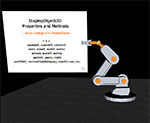
This is a slideshow viewer, utilizing the robot arm from this previous post done with Papervision 3D. I created it on the occasion of a presentation I'm preparing for the Flash user group, San Flashcisco. In typical fashion, I spent more time creating the slideshow program than preparing the presentation itself, or the slides for it.
Hotkeys:
[SPACE/BACKSPACE]  Next/previous slide
[BRACKET KEYS]     Next/previous slide without transition
[COMMA]            Zoom in and out of slide, for the fun of it

Also:              [1/Q, 2/W, 3/E, 4/R, 5/T, 6/Y, and 7/U] - Rotate joints
                   [Z,X,C,V] - Moves robot arm to various keyframes/poses
Run it from the desktop, with your own images:
This is really designed to run from the standalone Flash player or from a projector file (rather than inside the browser), where it can run in full screen mode with hotkeys enabled, and where it runs 2-3x faster (seriously). Download the necessary files here (ZIP file) to run this off your desktop (either by running the projector file executable for Windows or by running the SWF in the Flash standalone player). Then, you can also use your own images by editing the included xml file... It's not the most user friendly system, but it does the job. (Ideally, it should probably be wrapped into an AIR application).
The robot arm animations were created by arranging the model in various poses, storing the rotation values of the joints for each pose (in effect, creating keyframes), and then creating a tweening system to animate the arm from one keyframe to another. And lastly, creating a mini-sequencer to coordinate animations requiring multiple keyframes.