

Complex Spotlight Shadow Caster for Papervision3D
08 Jun 2009- Source code: SpotlightShadowCasterManager.as
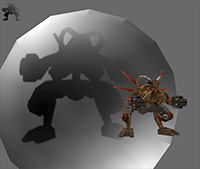 Click to run demo
Simulates the projection of shadows coming from a spotlight light source onto irregular surfaces. In the supplied example, an animated MD2 model (from Quake 2) is casting a shadow onto the inside of a sphere. Supported parameters include shadow color, alpha, blur, falloff and texture map size, as well as position, rotation and field of view. This evolves out of the previous projection test.
Usage:
After instantiating the manager --
_shadowCaster = new SpotlightShadowCasterManager();
-- assign one or more DisplayObject3D's that will block the light from the spotlight:
_shadowCaster.registerShadowCasterObject(myMesh);
Then register one or more meshes that can have shadows cast upon it with registerShadowCasterObject. As the second argument, you must supply a BitmapMaterial utilized by the mesh on which the manager will draw the shadows. Usually, you'll want to create a CompositeMaterial, with the BitmapMaterial most likely at the top of the stack. It might look something like this:
	var compositeMaterial = new CompositeMaterial();
	compositeMaterial.addMaterial( new ColorMaterial(0x888888) );
	var mat:BitmapMaterial = new BitmapMaterial( new BitmapData(1,1) );
	// .. the bitmapdata will get overwritten,
	//    but must contain _something_
	var sphere:TriangleMesh3D = new Sphere(compositeMaterial, 1000);

	_shadowCaster.registerShadowReceiverObject(sphere, mat);
To update the shadow textures, call
_shadowCaster.update();
-- probably in your onEnterFrame or onRenderTick function.
That's enough to get going. From there, it's just a matter of adjusting the projector's position and orientation in relation to the objects in your scene with the properties projectorPosition, projectorPitch, and projectorRoll. Check the source for the various configurable properties like blur, alpha, color, etc.
Limitations, bugs:
- As described above, objects must be manually assigned to be either a 'caster' or a 'receiver'. These roles aren't determined dynamically by the class itself.
- Only one level of shadows is supported. Adding an arbitrary number wouldn't be difficult, just cumbersome to manage under the current system, and increasingly expensive.
- Unfortunately, a 'shadow receiver' object can't have its own texture in addition to the one used to cast shadows onto, at least not in a way that looks decent. The reason is that a 3d object in Papervision3D has only one set of UV texture data and the shadow texture overwrites this with every update.
- There's undoubtedly a less expensive way to do the raycasting/projection in the main math routine in the private function updateMesh.
- Ugly and obvious artifacts show up on the 'projectable' textures when the spotlight is rotated 90 degrees away them. (You may have already noticed this in the previous two projection experiment posts).