Close Show/hide page

Collision detection between particles and polygons

Thumbnail - Click me

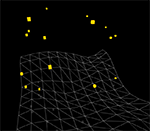
A basic example of collision detection in 3D, where moving particles bounce off a static terrain.

A couple things on it which could be of use …

(A) To find out where a moving particle hits a polygon boils down to asking the question, “Where does a ray intersects a plane?” One or two Google searches will give you some math and some code examples… The gist is that the particle plus its velocity vector gives you the “ray” in question; the plane that it does or does not intersect is the one created by the triangle of the polygon you’re testing against.

In this case, with the polygon which makes up the ‘terrain’, the triangles are set at regular intervals on the X/Z plane (in the parlance of Papervision3D, an instance of “Plane3D”), so it was relatively straightforward to find the right triangle to do a “hit test” on. If it’s a more irregularly shaped polygon, you’ll have to iterate thru all the triangles testing for the occurrence of an intersection, or find clever ways of minimizing the number of tests you have to perform on the polygon).

(B) When a collision has been detected, you have to figure out the direction of the bounce. The solution I arrived at comes from asking the question, “How do you rotate a point or vector around an arbitrary axis?” (Again, Google is your friend). In this case, that arbitrary axis is the normal of the triangle that the particle has hit. The velocity vector of the particle is reversed (since, after all, the particle has to “bounce”) and rotated 180 degrees. The result of this is that the angle between the new vector and the triangle normal equals the angle between the original vector and the triangle normal. I’m not sure if this makes sense in terms of real physics but it seems to make intuitive sense to me, and “looks” correct enough… If someone can comment on this, I’d appreciate it.

Source code: Main class file | Full project (Flex Builder 3)

Licensed under a Creative Commons Attribution 3.0 License.

14 Responses to “Collision detection between particles and polygons”

  1. Flash Bookmarks:

    Very nice stuff!

    We added your website.

  2. nicoptere:

    quite impressive and pretty useful too !
    thanks :)

  3. Ted | Limina.Studio:

    REALLY impressive. Very nice. Excellent framerate!! And yes, as far as I can tell from your explanation, the bounce math sounds right to me; abs(input_angle – normal) should equal abs(output_angle – normal).

  4. Keith Peters:

    bookmarked. thanks!

  5. katopz:

    i-think-i-love-u ;D

  6. duzengqiang:

    Excellent!
    Thanks!

  7. Nate Chatellier:

    Brilliant!

  8. Bela Korcsog:

    you are out of this world!

    Awesome effect!

  9. andrew:

    import com.lee.papervision.LeeCamera3D;
    import com.lee.papervision.PlaneHorizontal;
    import com.lee.papervision.Util3D;

    where i can find those classes?
    A.

  10. Fabrice Closier:

    That’s the kind of class that will give birth to many applications. Well done!

  11. Ari Braginsky:

    FYI the Flex 3 project is easily converted to build in Flashdevelop.

    Just create a new AS3 Flashdevelop project file in the “\ParticleCollisionTest\src” folder and add “ParticleCollisionTest\src_pv” to the project classpath.

    Be sure to also add an output SWF filename to the project settings.

  12. kapil:

    hi writer

    I am new in Graphics programming and written simply as you have mentioned. My Project is working fine , but i have two questions.

    1. when u said to reverse the velocity of the particle. what does that mean.
    ( as in my program
    A. i have calculated the distance between the last Position (before collide) and next supposed position (without collision) and that distance is considered as speed at a particular frame of time and that is applied for calculating next position after PLANE hit)

    2. i need some solution in which plane is also translating, rotating, or scaling..

    I am new in Posting Problems…
    If u didn’t get my problem, i can again explain in detail.

  13. felix:

    re-make marble madness anyone?

  14. Abinash Dev:

    Hello Lee…

    Wonderful work!!
    One question…have you included the util3d class in the flex source code?

    Thanks

Leave a Reply