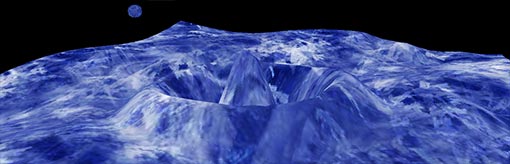
3D Sine Wave Study w/ Papervision3D
A wavey liquid surface being hit by rocks.
For best performance, you’ll want to use the version 9.0.60 Flash Player with a multi-core CPU. Press D to lower the level of detail if it’s killing your browser.
Other controls:
T cycles through different textures
B cycles through texture blend modes
W shows the 3D wireframe
+/- moves the camera in and out
Spacebar pauses the action, allowing you to rotate around the scene
Conceptually, here’s whats going on… (Snooze alert!)
Each ’splash’ is a heightmap of z-values that correspond to the vertices of the plane (instance of the PV3D class
Plane3D). For each value in the heightmap, we start with a sine function, where the ‘angle’ is the distance from the center of the splash plus an offset value that is incremented over time. Distance is also used to determine the sine wave’s decay. Finally, a multiplier variable going from 1 to 0 is used to flatten the heightmap over the life of the splash.

August 13th, 2007 at 7:38 am
Lee, once again you’ve come up with something amazing! You do know how to pull the best out of Papervision.
I can’t wait to see what you come up with next.
August 14th, 2007 at 6:40 am
Thanks, Bela.
August 14th, 2007 at 7:22 am
Nice work!
August 14th, 2007 at 7:38 am
That’s sick. Just sick.
August 14th, 2007 at 8:12 am
the WOW factor is going up again!
Nice Job!
August 15th, 2007 at 3:45 am
Looks cool!
Reminds me to this:
http://www.pouet.net/prod.php?which=1239
What about using this kind of materials on it?
http://mrdoob.com/?postid=388
August 15th, 2007 at 7:51 am
Impressive ! Congrats !
August 16th, 2007 at 3:27 am
Nice! really nice)) event though slow on my machine
August 16th, 2007 at 12:27 pm
Very nice! Amazing what you can come up with. How are you creating your animated textures? Are they being imported in as image sequences? It seems to load too fast to be a looping image sequence.
August 16th, 2007 at 8:18 pm
James-
The animation of the texture is done dynamically and isn’t ‘hardcoded’ using a sequence of bitmaps or an FLV. This is how it was is done:
A first layer is animated by draw()’ing the bitmap to the TextureMaterial of the plane, with an offset value which increments with each frame. Another copy is drawn adjacent and to the ‘left’ of it so that it appears to keep repeating.
The fun part comes when we do the same thing again (using the same bitmap), but this time using a BlendMode (hardlight by default) to create a second layer on top of the first. This second layer uses a separate offset value, and is flipped vertically for the sake of variation.
August 17th, 2007 at 4:42 am
woaw :) real fysics. it’s starting to itch over here, I wanna make a game in flash :)
keep this coming
August 17th, 2007 at 12:05 pm
NOOB!!!! :)
August 17th, 2007 at 3:57 pm
I really need to start diving into these blending options. I still have a hard time thinking in terms of bitmap effects in Flash. I’ve gone too long faking stuff, I need to break that habit. And I’m a traditional animator, who understands code, not a programmer by any stretch of the word. So everything I do is done the long way around, I frame by frame whatever I can.
Thanks for the insight, and again, great stuff!
August 18th, 2007 at 4:17 pm
awesome!.
August 20th, 2007 at 8:46 am
\m/ pwnage!
this looks great!
August 23rd, 2007 at 11:06 pm
nice work, real nice work…
best regards
Marcy
August 27th, 2007 at 3:09 am
wow awseome! the detail settings are also a nice feature, when it is in die browser die! mode, both of my cores from my m90 laptop are almost fully used:P
August 27th, 2007 at 3:15 am
ohw that was with the papiervison demo from pv itself running in the background.. hopefully there will be dualcore support within a single animation is build in in the future:)
August 27th, 2007 at 7:48 am
Chris,
If you have dual core CPU, install the most recent beta Flash Player, as it will, in fact, put both cores to use for a single piece of Flash.
http://labs.adobe.com/technologies/flashplayer9/
On CPU-heavy Flash pieces, I’ll get maybe a 50% increase in framerate using the new player.
Lee
September 21st, 2007 at 9:56 pm
Hi Lee,
This work has been really useful in explaining what I’m working on in my final year architecture project. I was wondering if you might be able to help me save hours and hours of arithmatic with your program?
Can you please email me so I can describe the problem.
Just to give you an idea, I’m working with sound waves, consonance and dissonance in music etc. and I’m using the waveform to generate a form in space where each node(like the little drops in your animation) represents a certain frequency (and wavelength). I’m trying to work out the interference pattern from that to get the form, but it’s very laborious! If I could somehow input some specific numbers and adjust the rules slightly (i.e. no decay), and then snapshot it at the point where I want to extract the 3D form, that would be REALLY helpful.
Cheers, Chris.
December 5th, 2007 at 2:50 pm
Are you planning on posting the source to this very wonderful piece of work?
January 15th, 2008 at 4:51 am
Great work!
March 2nd, 2008 at 12:36 pm
Nice!
March 2nd, 2008 at 12:48 pm
Nice work!
July 6th, 2008 at 12:25 am
That is interesting. Thanks for sharing it.